> ## Documentation Index
> Fetch the complete documentation index at: https://docs.coderabbit.ai/llms.txt
> Use this file to discover all available pages before exploring further.
# Change Stack
> Change Stack is CodeRabbit's PR inspection interface. It reorganizes a pull request from a flat file list into a structured, layer-by-layer walkthrough. Reviewers can explore the change in a logical order instead of alphabetical file order. Each *cohort* includes range-specific summaries and, when useful, diagrams.
export const Hint = ({type, children, headline, tip, href, cta}) => {
const TIPS = {
learnings: {
headline: "Learnings",
tip: "Review preferences CodeRabbit learns from your chat conversations and applies automatically to future reviews.",
cta: "Learn about Learnings",
href: "/knowledge-base/learnings",
content: "Learnings"
},
walkthrough: {
headline: "PR Walkthrough",
tip: "A structured comment posted by CodeRabbit at the top of every pull request, summarizing changes, sequence diagrams, review effort, and more.",
cta: "Learn about PR Walkthroughs",
href: "/pr-reviews/walkthroughs",
content: "Walkthrough"
},
"finishing-touches": {
headline: "Finishing Touches",
tip: "Post-review agentic actions (Autofix, writing docstrings or unit tests, and more) you trigger from a PR comment or a checkbox in the Walkthrough.",
cta: "See all Finishing Touches",
href: "/finishing-touches",
content: "Finishing Touches"
},
"coding-plan": {
headline: "Coding Plan",
tip: "A detailed, codebase-aware implementation plan CodeRabbit generates from an issue or description, ready to hand off to any coding agent.",
cta: "Learn about Coding Plans",
href: "/plan",
content: "Coding Plan"
},
"knowledge-base": {
headline: "Knowledge Base",
tip: "The collected context sources CodeRabbit draws on during reviews: Learnings, Code Guidelines, issue trackers, connected MCP servers, and cross-repo analysis.",
cta: "Explore the Knowledge Base",
href: "/knowledge-base",
content: "Knowledge Base"
},
"path-instructions": {
headline: "Path Instructions",
tip: "Custom review rules that only apply to files matching a glob pattern, e.g. 'src/controllers/**'.",
cta: "Configure path instructions",
href: "/configuration/path-instructions",
content: "Path Instructions"
},
"change-stack": {
headline: "Change Stack",
tip: "An improved code inspection interface that reorganizes a pull request from a flat file list into a structured, layer-by-layer walkthrough with range-specific summaries and diagrams when useful.",
cta: "Learn about Change Stack",
href: "/pr-reviews/change-stack",
content: "Change Stack"
},
scope: {
headline: "Scope",
tip: "A named set of repositories, connections, and spend limits that controls what CodeRabbit Agent can access in a given Slack conversation.",
cta: "Learn about Scopes",
href: "/slack-agent/scopes",
content: "Scope"
},
"coderabbit-agent": {
headline: "CodeRabbit Agent for Slack",
tip: "An AI agent built into Slack that investigates issues, generates implementation plans, and opens pull requests right from the Slack threads.",
cta: "Explore CodeRabbit Agent",
href: "/slack-agent",
content: "CodeRabbit Agent"
},
"configuration-inheritance": {
headline: "Configuration Inheritance",
tip: "A setting that merges configuration values across multiple levels — repository YAML, central YAML, and UI settings — instead of using only the highest-priority source.",
cta: "Learn about Configuration Inheritance",
href: "/configuration/configuration-inheritance",
content: "Configuration Inheritance"
}
};
const defaults = TIPS[type] || ({});
return
{children ?? defaults.content}
;
};
export const EarlyAccessBadge = ({tip = "This feature is in early access. Enable it by setting `early_access: true` in your `.coderabbit.yaml`, or by toggling Early Access on the web interface.", title = "Early Access", cta = "View configuration", href = "/reference/configuration#param-early-access", disabled = false}) => {
return
{title}
;
};
export const ProPlusPlanBadge = ({tip = "This feature is available as part of the Pro+ plan and Enterprise plan. Please refer to our pricing page for more information about our plans and features.", title = "Pro+ Plan", cta = "Read more", href = "https://coderabbit.ai/pricing", disabled = false}) => {
return
{title}
;
};
export const AzureBadge = ({tip = "This feature is available on Azure DevOps.", title = "Azure", cta, href, disabled = false}) => {
return
{title}
;
};
export const GitLabBadge = ({tip = "This feature is available on GitLab.", title = "GitLab", cta, href, disabled = false}) => {
return
{title}
;
};
export const GitHubBadge = ({tip = "This feature is available on GitHub and GitHub Enterprise.", title = "GitHub", cta, href, disabled = false}) => {
return
{title}
;
};
|
## Overview
Change Stack is CodeRabbit's PR inspection interface. It takes any pull request and reorganizes it into a small number of independent **change cohorts**, logical groupings of related work, each broken into ordered **layers** that reflect the natural reading order of the change. Every layer anchors to specific line ranges in the diff, each with its own summary.
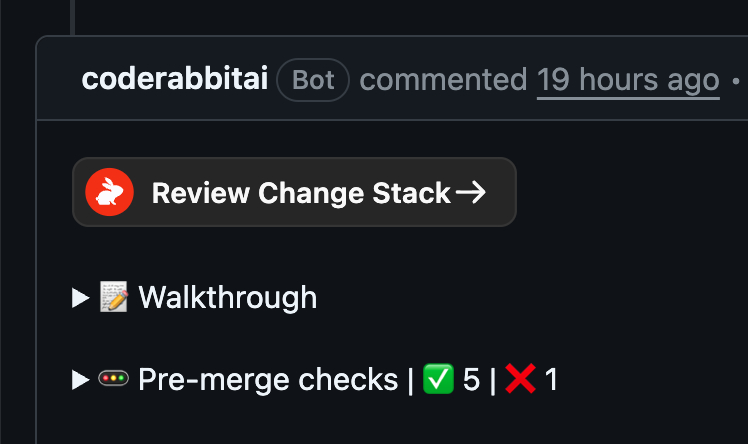
Reviewers open Change Stack from the [`Review Change Stack →`](#opening-change-stack) button that CodeRabbit posts in the PR Walkthrough comment. Inside, they navigate cohorts and layers with the keyboard. On GitHub and GitLab, they can also drop inline comments against specific ranges and submit native review feedback without leaving the Change Stack tab.
Change Stack is available on GitHub Cloud, GitHub Enterprise Server, GitLab.com, self-managed GitLab, and Azure DevOps. Azure DevOps support is read-only during early access; inline commenting and review submission are not yet supported. Change Stack is in [early access](/early-access) and is available to all users during launch. It will be part of the Pro+ plan going forward.
## Why Change Stack
AI-assisted development has made pull requests larger and more frequent; a single AI-authored change can touch dozens of files across multiple layers of a codebase. A git provider's or IDE's default diff view can present those files alphabetically without reflecting the logical dependencies between them. Change Stack reorganizes the diff into cohorts and layers that reflect the structure of the change:
* **Cohorts** group related files and hunks that belong together conceptually.
* **Layers** order those groups so foundational changes (data shapes, contracts) come before the code that depends on them (consumers, call sites, tests).
* **Range summaries** explain each contiguous block of changed lines in plain language.
* **Diagrams** are generated inline for layers where a visual earns its place, such as sequence diagrams for new call flows, state machines for lifecycle changes, and ERDs for data model updates. Layers that do not warrant a diagram do not get one.
## Opening Change Stack
Every pull request review comment from CodeRabbit includes a **Review Change Stack →** button above the standard walkthrough. Clicking it opens the review in the Change Stack interface.
 Change Stack is opt-in per reviewer. Teammates who prefer their git provider's default review experience can ignore the button. Nothing about the PR workflow changes for them.
## The three-panel layout
Change Stack uses a fixed three-panel layout tuned for rapid navigation:
| Panel | Contents |
| ------ | -------------------------------------------------------------------------------------------------------------------------------------------------------------------------------------------------- |
| Left | Cohort and layer navigation, plus an **All files** view for jumping to any file in CodeRabbit's review scope. Each layer shows its file count and comment count. |
| Center | The unified, split, or semantic diff for the active layer, scoped to the relevant line ranges. Click a variable, function, class, or type name to look up its definition and usages via Code Peek. |
| Right | Per-range AI summaries for the visible diff, plus Context, Comments, and Chat surfaces for inline discussion and follow-up questions. |
Change Stack reflects CodeRabbit's review scope, not necessarily the full pull request file list on the host platform. Files excluded by default ignore rules or configured [Path filters](/configuration/path-instructions#path-filters) are omitted from cohorts, layer file counts, and file navigation.
### Overview
The left rail includes an **Overview** entry above the numbered layers when the Overview surface is available. Use it for a high-level read on the pull request: the PR description, CodeRabbit's Walkthrough, and anything that needs attention before merge, including blockers, unresolved CodeRabbit issues, and required actions.
The **Needs your attention** section is where reviewers open CodeRabbit findings, minor findings, and changes-requested reviews. Opening one of these displays the [review-conversation viewer](#review-conversations) in Change Stack instead of immediately taking you to GitHub or GitLab.
The Overview rail entry shows merge status at a glance. Its status icon and subtitle summarize whether the pull request is ready to merge, has warnings, is blocked, is closed, or is already merged. Hover the Overview entry to see a richer status breakdown.
Overview has its own `/overview` path for sharing and browser navigation. A bare Change Stack deep link opens Layer 1 by default; use the Overview entry or the `/overview` path to open the summary view directly.
### Keyboard navigation
Change Stack is designed to be driven from the keyboard:
| Shortcut | Action |
| ------------ | ----------------------------------------- |
| J | Advance to the next layer |
| K | Go back to the previous layer |
| Z | Toggle focus mode (hides the side panels) |
Reviewers can also switch between unified, split, and semantic diff views, hide whitespace-only changes, step through the review order using the arrow controls in the diff header, and use the **All files** view to search the reviewed file tree. Diff lines wrap automatically in all views.
## Reviewing in Change Stack
Change Stack supports native review workflows on the host platform, including inline comments and review submission without leaving the Change Stack interface. Reviews post back to GitHub or GitLab natively, so comments and approvals land exactly where your team expects them.
Change Stack is opt-in per reviewer. Teammates who prefer their git provider's default review experience can ignore the button. Nothing about the PR workflow changes for them.
## The three-panel layout
Change Stack uses a fixed three-panel layout tuned for rapid navigation:
| Panel | Contents |
| ------ | -------------------------------------------------------------------------------------------------------------------------------------------------------------------------------------------------- |
| Left | Cohort and layer navigation, plus an **All files** view for jumping to any file in CodeRabbit's review scope. Each layer shows its file count and comment count. |
| Center | The unified, split, or semantic diff for the active layer, scoped to the relevant line ranges. Click a variable, function, class, or type name to look up its definition and usages via Code Peek. |
| Right | Per-range AI summaries for the visible diff, plus Context, Comments, and Chat surfaces for inline discussion and follow-up questions. |
Change Stack reflects CodeRabbit's review scope, not necessarily the full pull request file list on the host platform. Files excluded by default ignore rules or configured [Path filters](/configuration/path-instructions#path-filters) are omitted from cohorts, layer file counts, and file navigation.
### Overview
The left rail includes an **Overview** entry above the numbered layers when the Overview surface is available. Use it for a high-level read on the pull request: the PR description, CodeRabbit's Walkthrough, and anything that needs attention before merge, including blockers, unresolved CodeRabbit issues, and required actions.
The **Needs your attention** section is where reviewers open CodeRabbit findings, minor findings, and changes-requested reviews. Opening one of these displays the [review-conversation viewer](#review-conversations) in Change Stack instead of immediately taking you to GitHub or GitLab.
The Overview rail entry shows merge status at a glance. Its status icon and subtitle summarize whether the pull request is ready to merge, has warnings, is blocked, is closed, or is already merged. Hover the Overview entry to see a richer status breakdown.
Overview has its own `/overview` path for sharing and browser navigation. A bare Change Stack deep link opens Layer 1 by default; use the Overview entry or the `/overview` path to open the summary view directly.
### Keyboard navigation
Change Stack is designed to be driven from the keyboard:
| Shortcut | Action |
| ------------ | ----------------------------------------- |
| J | Advance to the next layer |
| K | Go back to the previous layer |
| Z | Toggle focus mode (hides the side panels) |
Reviewers can also switch between unified, split, and semantic diff views, hide whitespace-only changes, step through the review order using the arrow controls in the diff header, and use the **All files** view to search the reviewed file tree. Diff lines wrap automatically in all views.
## Reviewing in Change Stack
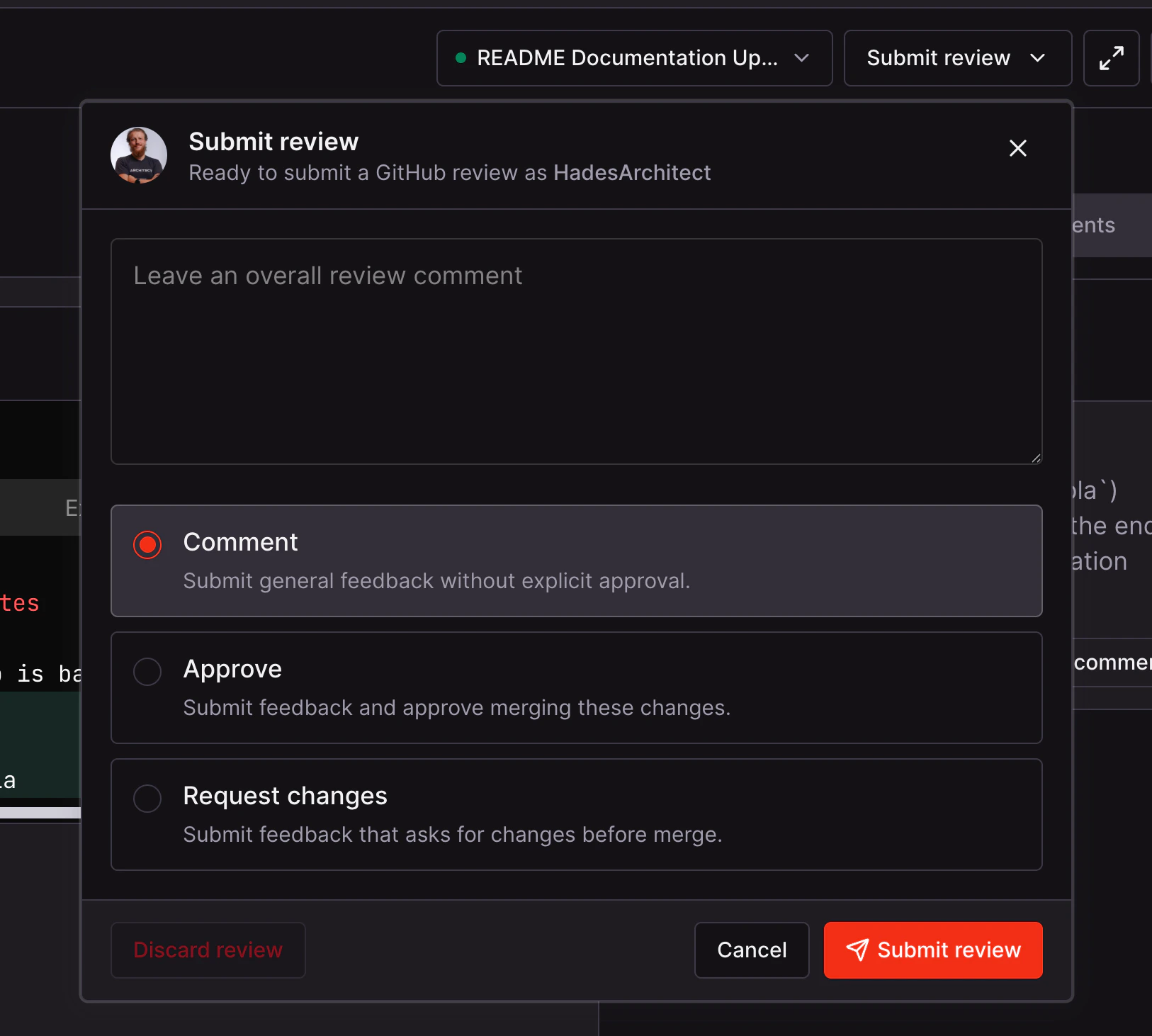
Change Stack supports native review workflows on the host platform, including inline comments and review submission without leaving the Change Stack interface. Reviews post back to GitHub or GitLab natively, so comments and approvals land exactly where your team expects them.
 ### Inline comments
Every range summary in the right panel has an **Add block comment** action that opens a comment against the exact line range covered by the summary. Comments accumulate into a pending review, which you submit from the **Submit review** menu in the top-right corner.
The comment composer supports platform-native autocomplete for user and team mentions, issue references, pull request references, metadata references, and emoji shortcodes.
On GitLab, Change Stack also supports replying inside existing merge-request discussions and applying selected inline suggestion blocks as a commit back to the source branch.
### Review conversations
Opening a finding or changes-requested review from Overview shows an in-app viewer with grouped review threads: the pull-request-level review body first, followed by inline conversations. Each thread includes replies and resolved or outdated indicators, and you can use the existing review actions to reply and resolve eligible conversations. Changes-requested cards identify the reviewer and show the number of unresolved inline conversations.
For file-anchored conversations, **See in layer context** closes the viewer and selects the relevant code layer. Comments that CodeRabbit cannot map to a layer retain a validated link to GitHub or GitLab.
The viewer appears as a dialog on desktop and a bottom drawer on mobile.
### Chat with AI
When AI chat is available for the session, the right rail can switch from review context into a dedicated chat panel. Reviewers can open chat from the main rail or directly from a range summary to ask follow-up questions about the current layer, file, or highlighted range.
The chat composer also supports voice input. Use the microphone button to record a prompt, then let CodeRabbit transcribe it into the chat before sending.
### Code Peek
Click a variable, function, class, or type name to look up its definition and usages. Code Peek uses GitHub code search to show likely definitions and references with surrounding context, so you can follow the code without leaving the review.
Code Peek is available in GitHub Change Stack sessions when CodeRabbit has the GitHub access it needs for the repository. If GitHub needs to be reconnected or code search is unavailable for the session, Code Peek is not shown.
When a result points to a changed file in the pull request, **Open in Change Stack** jumps to that file. Change Stack keeps an in-page back trail so you can return to where you started.
### Finishing touches and coding tasks
Change Stack can queue coding tasks from reviewer feedback or from the AI chat panel. The coding workflow includes finishing touches such as generating unit tests or docstrings for the current review.
The coding panel tracks task progress as work moves through queued, running, patch-ready, and completed states, and it preserves the resulting patch, commit, or stacked PR details when those artifacts are created.
### Files viewed
On GitHub, marking a file as viewed in Change Stack syncs with GitHub's **Viewed** state on the same file, so your progress is visible to other reviewers and persists if you switch back to the GitHub UI.
## Snapshots and stale-state protection
Every time the PR author pushes a new commit, Change Stack generates a new **snapshot** of the change and retains previous ones. A snapshot dropdown in the header lets reviewers switch between snapshots to answer the question *"what changed since I last looked?"*, even across rebases and force-pushes.
While a new snapshot is being generated, Change Stack disables commenting on the current view and shows a banner until the new snapshot is ready. This prevents reviewers from leaving comments against a diff that no longer reflects the tip of the branch.
## Access and permissions
Change Stack authenticates with a repo-scoped Git provider grant and preserves your return path through SSO, so links work end-to-end even on organizations with enforced SSO. Public-link sharing is supported within the limits of the underlying repository's access controls, so a reviewer without access to the repo will not be able to open Change Stack.
## What's next
Learn how CodeRabbit's walkthrough comment structures every review and feeds the layer summaries you see in Change Stack.
See how CodeRabbit generates the plain-language summary that appears in the PR description alongside the Review Change Stack button.
Enforce review requirements, including linked issues, title conventions, and custom checks, before a PR can merge.
### Inline comments
Every range summary in the right panel has an **Add block comment** action that opens a comment against the exact line range covered by the summary. Comments accumulate into a pending review, which you submit from the **Submit review** menu in the top-right corner.
The comment composer supports platform-native autocomplete for user and team mentions, issue references, pull request references, metadata references, and emoji shortcodes.
On GitLab, Change Stack also supports replying inside existing merge-request discussions and applying selected inline suggestion blocks as a commit back to the source branch.
### Review conversations
Opening a finding or changes-requested review from Overview shows an in-app viewer with grouped review threads: the pull-request-level review body first, followed by inline conversations. Each thread includes replies and resolved or outdated indicators, and you can use the existing review actions to reply and resolve eligible conversations. Changes-requested cards identify the reviewer and show the number of unresolved inline conversations.
For file-anchored conversations, **See in layer context** closes the viewer and selects the relevant code layer. Comments that CodeRabbit cannot map to a layer retain a validated link to GitHub or GitLab.
The viewer appears as a dialog on desktop and a bottom drawer on mobile.
### Chat with AI
When AI chat is available for the session, the right rail can switch from review context into a dedicated chat panel. Reviewers can open chat from the main rail or directly from a range summary to ask follow-up questions about the current layer, file, or highlighted range.
The chat composer also supports voice input. Use the microphone button to record a prompt, then let CodeRabbit transcribe it into the chat before sending.
### Code Peek
Click a variable, function, class, or type name to look up its definition and usages. Code Peek uses GitHub code search to show likely definitions and references with surrounding context, so you can follow the code without leaving the review.
Code Peek is available in GitHub Change Stack sessions when CodeRabbit has the GitHub access it needs for the repository. If GitHub needs to be reconnected or code search is unavailable for the session, Code Peek is not shown.
When a result points to a changed file in the pull request, **Open in Change Stack** jumps to that file. Change Stack keeps an in-page back trail so you can return to where you started.
### Finishing touches and coding tasks
Change Stack can queue coding tasks from reviewer feedback or from the AI chat panel. The coding workflow includes finishing touches such as generating unit tests or docstrings for the current review.
The coding panel tracks task progress as work moves through queued, running, patch-ready, and completed states, and it preserves the resulting patch, commit, or stacked PR details when those artifacts are created.
### Files viewed
On GitHub, marking a file as viewed in Change Stack syncs with GitHub's **Viewed** state on the same file, so your progress is visible to other reviewers and persists if you switch back to the GitHub UI.
## Snapshots and stale-state protection
Every time the PR author pushes a new commit, Change Stack generates a new **snapshot** of the change and retains previous ones. A snapshot dropdown in the header lets reviewers switch between snapshots to answer the question *"what changed since I last looked?"*, even across rebases and force-pushes.
While a new snapshot is being generated, Change Stack disables commenting on the current view and shows a banner until the new snapshot is ready. This prevents reviewers from leaving comments against a diff that no longer reflects the tip of the branch.
## Access and permissions
Change Stack authenticates with a repo-scoped Git provider grant and preserves your return path through SSO, so links work end-to-end even on organizations with enforced SSO. Public-link sharing is supported within the limits of the underlying repository's access controls, so a reviewer without access to the repo will not be able to open Change Stack.
## What's next
Learn how CodeRabbit's walkthrough comment structures every review and feeds the layer summaries you see in Change Stack.
See how CodeRabbit generates the plain-language summary that appears in the PR description alongside the Review Change Stack button.
Enforce review requirements, including linked issues, title conventions, and custom checks, before a PR can merge.