> ## Documentation Index
> Fetch the complete documentation index at: https://docs.coderabbit.ai/llms.txt
> Use this file to discover all available pages before exploring further.
# CodeRabbit Reverse Tunnel
> Connect CodeRabbit to a private-network Git platform without opening inbound network access. Available for GitHub Enterprise Server and self-managed GitLab.
export const EnterprisePlanBadge = ({tip = "This feature is available exclusively as part of the Enterprise plan. Please refer to our pricing page for more information about our plans and features.", title = "Enterprise Plan", cta = "Read more", href = "https://coderabbit.ai/pricing", disabled = false}) => {
return
{title}
;
};
export const GitLabBadge = ({tip = "This feature is available on GitLab.", title = "GitLab", cta, href, disabled = false}) => {
return
{title}
;
};
export const GitHubBadge = ({tip = "This feature is available on GitHub and GitHub Enterprise.", title = "GitHub", cta, href, disabled = false}) => {
return
{title}
;
};
|
The **CodeRabbit Reverse Tunnel** is a private-network connectivity option for Enterprise customers who cannot expose their Git platform to the public internet. A CodeRabbit-provided Connector runs inside your network, dials out to CodeRabbit over WebSocket Secure (WSS), and carries CodeRabbit-initiated API and HTTPS Git traffic through that existing outbound session.
## Intended use
The CodeRabbit Reverse Tunnel is intended for Enterprise customers with the constraints defined below:
* Your GitHub Enterprise Server or self-managed GitLab instance runs in a private subnet, private cloud account, or on-premises network.
* Your Git platform cannot receive inbound connections from CodeRabbit or the public internet.
* Your security policy does not allow inbound firewall exceptions, vendor IP allowlisting on the Git platform side, or external PrivateLink peering.
Use this option when CodeRabbit must review pull requests on a Git instance that has no public endpoint, no inbound firewall exceptions, no vendor IP allowlisting, and no PrivateLink or peering path.
For instances that CodeRabbit can already reach directly, use the standard [GitHub Enterprise Server guide](/platforms/github-enterprise-server) or [self-managed GitLab guide](/platforms/self-hosted-gitlab). At the moment there is no self-service interface, reverse tunnel setup is handled by [CodeRabbit Sales](https://www.coderabbit.ai/contact-us/sales) or [Support](/support).
## Components
The CodeRabbit Reverse Tunnel has four components:
1. **Reverse Tunnel Gateway** — A CodeRabbit-managed edge service that accepts Connector sessions and exposes tenant-scoped HTTPS routes for CodeRabbit services to call into.
2. **Reverse Tunnel Connector** — A lightweight, CodeRabbit-provided container that runs inside your network and establishes a long-lived outbound connection (WSS over HTTPS) to the Reverse Tunnel Gateway. CodeRabbit then sends runtime requests — clone, read pull requests, post review comments — over this pre-established tunnel. The Connector dials out from your network; no inbound ports are opened.
3. **Route key** — A unique, opaque routing identifier issued by CodeRabbit for your tenant. CodeRabbit uses the route key to direct runtime traffic to the correct Connector session, so your private Git platform address is never exposed in the URL path.
4. **Connector token** — A bearer token issued by CodeRabbit for your tenant. Multiple Connector replicas can share the same token.
## Architecture
 The CodeRabbit Reverse Tunnel uses two connectivity paths between the customer network and the CodeRabbit cloud. Direction is described from the customer's perspective:
| Direction | Purpose | Network path |
| --------------------------------------------- | ----------------------------------------------------------------------------------------------------------------------------------------------- | ----------------------------------------------------------------------------------------------------------------------------------------------------------------------------------------------------------------------------------------- |
| **Inbound**
The CodeRabbit Reverse Tunnel uses two connectivity paths between the customer network and the CodeRabbit cloud. Direction is described from the customer's perspective:
| Direction | Purpose | Network path |
| --------------------------------------------- | ----------------------------------------------------------------------------------------------------------------------------------------------- | ----------------------------------------------------------------------------------------------------------------------------------------------------------------------------------------------------------------------------------------- |
| **Inbound**
(CodeRabbit → Git platform) | Clone repositories over HTTPS, read pull requests, fetch files and commits, create reviews, post comments, and update checks or commit statuses | CodeRabbit services call the Reverse Tunnel Gateway, which forwards the request into your network over the long-lived WSS session opened by the Reverse Tunnel Connector. The Connector then makes an internal call to your Git platform. |
| **Outbound**
(Git platform → CodeRabbit) | Deliver webhook events such as pull request opened, synchronized, reviewed, or commented | Your Git platform sends standard HTTPS webhooks outbound through the customer NAT gateway to the CodeRabbit webhook receiver. |
The tunnel carries only CodeRabbit-initiated inbound traffic. Outbound webhooks continue to flow through your existing customer NAT and use the webhook secret or token configured for that platform.
## PR review flow through the Tunnel
End-to-end view of how a single pull request moves through the CodeRabbit Reverse Tunnel. None of the network mechanics are visible to the developer — from their point of view, CodeRabbit simply reviews their change.
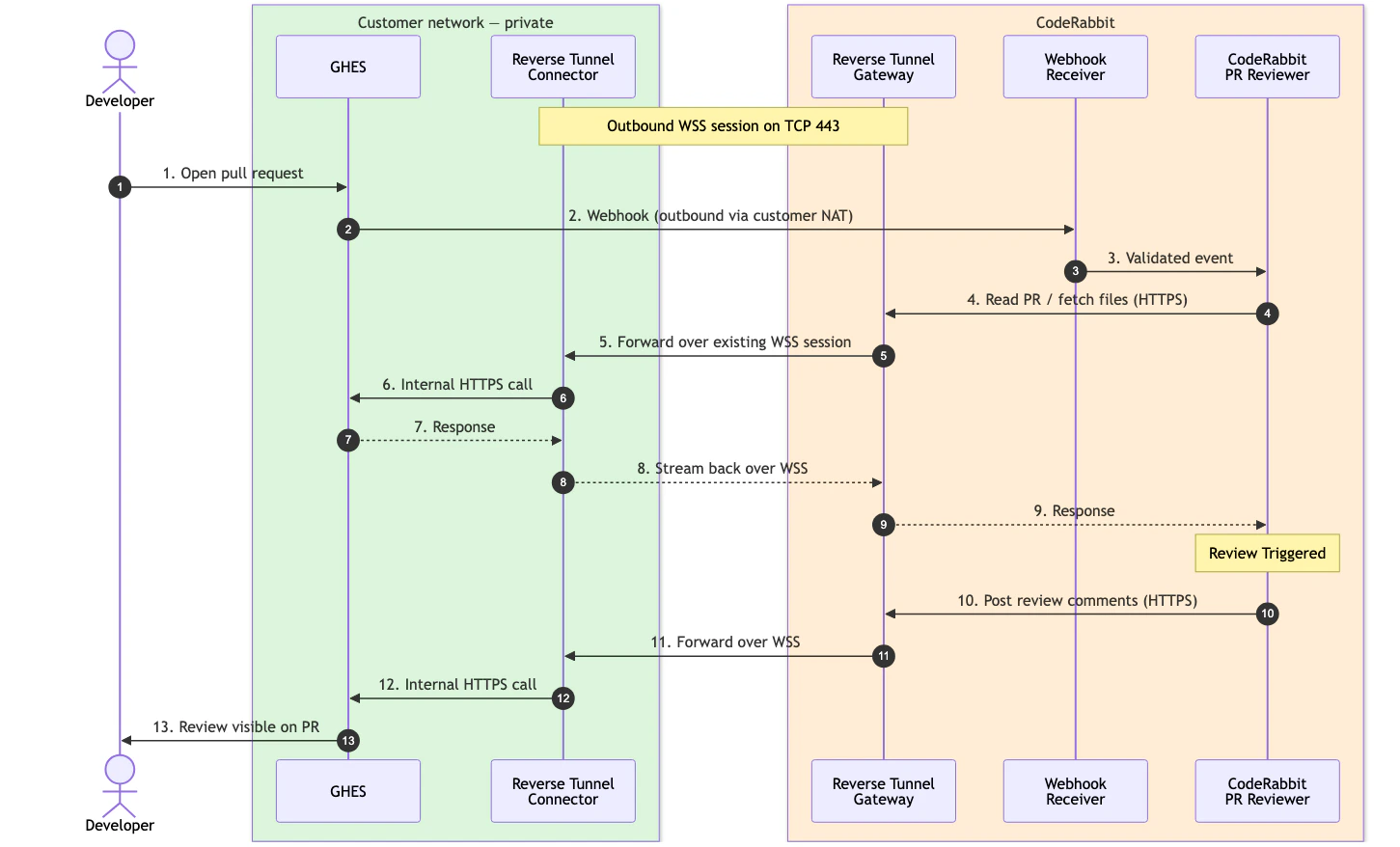 * **Developer opens a pull request** inside your private Git platform.
* **Your Git platform sends a webhook to CodeRabbit** outbound through your customer NAT.
* **CodeRabbit reads the pull request through the tunnel.** The Reverse Tunnel Gateway routes the request over the existing WSS session; the Reverse Tunnel Connector forwards it to your Git platform and streams the response back.
* **CodeRabbit runs the review** and writes the feedback.
* **CodeRabbit posts the comments back through the same tunnel**, and the review appears on the pull request.
## High availability
Run at least two connector replicas for production.
All replicas for the same tenant normally share the same gateway URL, connector token, route key, target base URL, and origin TLS policy. By default, the gateway tracks the live connector sessions for the route and uses an active session for each new request. Round-robin routing is also supported with `REVERSE_TUNNEL_DIRECT_CONNECTOR_ROUTING=true`.
Important behavior:
* New requests can use another live connector after a connector disconnects.
* In-flight requests are not transparently moved to another connector.
* The connector reconnects automatically with exponential backoff after a lost WSS session.
## Capacity and limitations
The tunnel streams request and response bodies with backpressure, so it supports large HTTPS clone/fetch traffic. Capacity is still bounded by your connector replicas, network egress, and Git platform origin capacity.
| Area | Behavior |
| ---------------- | ------------------------------------------------------------------------------------------------------------------------------------------------------------------------------------------------------------------------------------------------------------------------------------------------------------------------------------------------------------------------------------------------------------------------- |
| Concurrency | The gateway enforces a per-connector concurrent stream limit. CodeRabbit provides the active limit during onboarding. Add connector replicas to increase available concurrency. |
| Buffering | The connector does not provide durable buffering while offline. If a connector is down, new runtime calls to your Git platform fail until another connector is available. |
| Git protocol | HTTPS only. |
| Platform support | Available for **GitHub Enterprise Server** and **self-managed GitLab**. GitLab reverse-tunnel setup requires contacting [CodeRabbit Support](/support) (existing customers) or [CodeRabbit Sales](https://www.coderabbit.ai/contact-us/sales) (new customers). For information about support for Azure DevOps and other Git platforms please contact [CodeRabbit Sales team](https://www.coderabbit.ai/contact-us/sales). |
## FAQ
No. The connector opens an outbound WSS session to CodeRabbit. CodeRabbit-initiated Git platform traffic rides over that existing session.
Yes. Multiple connector replicas can serve the same route key. Default routing uses an active live session for each new request, and round-robin routing is also supported with `REVERSE_TUNNEL_DIRECT_CONNECTOR_ROUTING=true`. Give each live replica a unique `REVERSE_TUNNEL_CONNECTOR_ID`.
Yes. The connector needs outbound HTTPS to the CodeRabbit gateway and HTTPS reachability to your Git platform origin. Your Git platform needs outbound HTTPS to the CodeRabbit webhook receiver.
The connector reconnects automatically. In-flight requests fail and are retried only when CodeRabbit can safely retry the operation.
No. The tunnel is scoped to CodeRabbit HTTP(S) and HTTPS Git traffic for the configured Git platform. It is not a general-purpose private-network proxy.
## What's next
Create the OAuth App, GitHub App, webhook secret, and permissions used by the GHES integration.
Review the standard self-managed GitLab requirements used with reverse-tunnel onboarding.
Review all supported Git platforms and choose the right integration path for your environment.
* **Developer opens a pull request** inside your private Git platform.
* **Your Git platform sends a webhook to CodeRabbit** outbound through your customer NAT.
* **CodeRabbit reads the pull request through the tunnel.** The Reverse Tunnel Gateway routes the request over the existing WSS session; the Reverse Tunnel Connector forwards it to your Git platform and streams the response back.
* **CodeRabbit runs the review** and writes the feedback.
* **CodeRabbit posts the comments back through the same tunnel**, and the review appears on the pull request.
## High availability
Run at least two connector replicas for production.
All replicas for the same tenant normally share the same gateway URL, connector token, route key, target base URL, and origin TLS policy. By default, the gateway tracks the live connector sessions for the route and uses an active session for each new request. Round-robin routing is also supported with `REVERSE_TUNNEL_DIRECT_CONNECTOR_ROUTING=true`.
Important behavior:
* New requests can use another live connector after a connector disconnects.
* In-flight requests are not transparently moved to another connector.
* The connector reconnects automatically with exponential backoff after a lost WSS session.
## Capacity and limitations
The tunnel streams request and response bodies with backpressure, so it supports large HTTPS clone/fetch traffic. Capacity is still bounded by your connector replicas, network egress, and Git platform origin capacity.
| Area | Behavior |
| ---------------- | ------------------------------------------------------------------------------------------------------------------------------------------------------------------------------------------------------------------------------------------------------------------------------------------------------------------------------------------------------------------------------------------------------------------------- |
| Concurrency | The gateway enforces a per-connector concurrent stream limit. CodeRabbit provides the active limit during onboarding. Add connector replicas to increase available concurrency. |
| Buffering | The connector does not provide durable buffering while offline. If a connector is down, new runtime calls to your Git platform fail until another connector is available. |
| Git protocol | HTTPS only. |
| Platform support | Available for **GitHub Enterprise Server** and **self-managed GitLab**. GitLab reverse-tunnel setup requires contacting [CodeRabbit Support](/support) (existing customers) or [CodeRabbit Sales](https://www.coderabbit.ai/contact-us/sales) (new customers). For information about support for Azure DevOps and other Git platforms please contact [CodeRabbit Sales team](https://www.coderabbit.ai/contact-us/sales). |
## FAQ
No. The connector opens an outbound WSS session to CodeRabbit. CodeRabbit-initiated Git platform traffic rides over that existing session.
Yes. Multiple connector replicas can serve the same route key. Default routing uses an active live session for each new request, and round-robin routing is also supported with `REVERSE_TUNNEL_DIRECT_CONNECTOR_ROUTING=true`. Give each live replica a unique `REVERSE_TUNNEL_CONNECTOR_ID`.
Yes. The connector needs outbound HTTPS to the CodeRabbit gateway and HTTPS reachability to your Git platform origin. Your Git platform needs outbound HTTPS to the CodeRabbit webhook receiver.
The connector reconnects automatically. In-flight requests fail and are retried only when CodeRabbit can safely retry the operation.
No. The tunnel is scoped to CodeRabbit HTTP(S) and HTTPS Git traffic for the configured Git platform. It is not a general-purpose private-network proxy.
## What's next
Create the OAuth App, GitHub App, webhook secret, and permissions used by the GHES integration.
Review the standard self-managed GitLab requirements used with reverse-tunnel onboarding.
Review all supported Git platforms and choose the right integration path for your environment.