

To use linked issues with Jira or Linear, you must first enable the
corresponding integration. Note that these integrations are enabled for
private repositories by default, but disabled for public repositories. See
Issue trackers for setup instructions.
Understanding linked issues
A linked issue can be referenced in pull request text or attached through a platform-native link. For GitHub, GitLab, Jira, and Linear, CodeRabbit detects references in the pull request description using platform-specific syntax:Azure DevOps linked work items
For Azure DevOps, CodeRabbit also uses work items attached through Azure DevOps’ native Development / linked-work-items interface. This path does not require the pull request title, description, or branch name to mention the work item. Native links are handled separately from PR-text references; the text-reference formats above continue to work for the other platforms. CodeRabbit adds the linked work item’s title, description, state, tags, project, creator, timestamps, and URL to the review context. It uses up to 200 valid linked work items. Deleted or permission-restricted work items are omitted without discarding the remaining linked-work-item context. When CodeRabbit detects linked issues, it analyzes them against your pull request changes to determine if the requirements are met: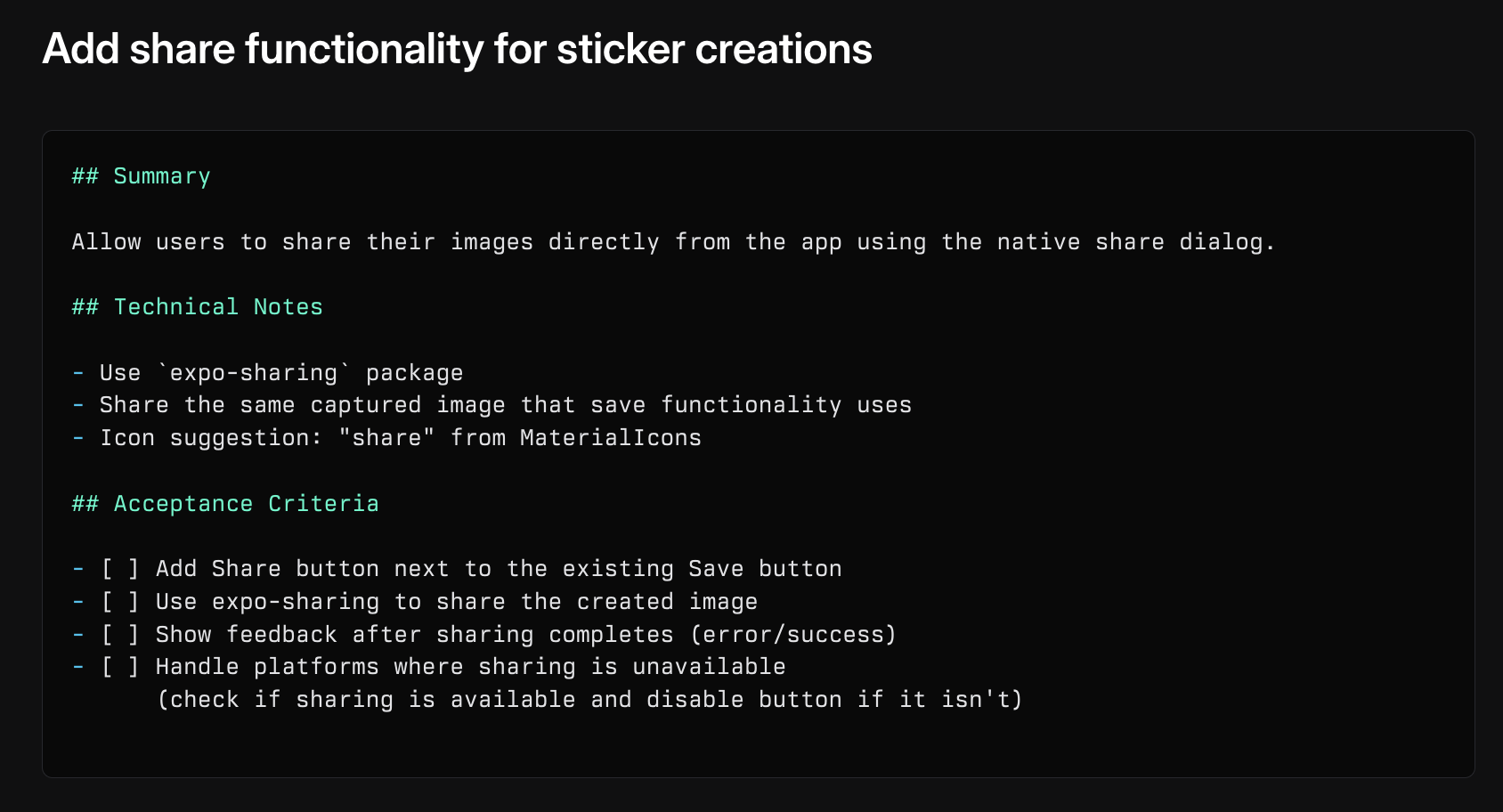
A well-structured Linear issue with clear acceptance criteria
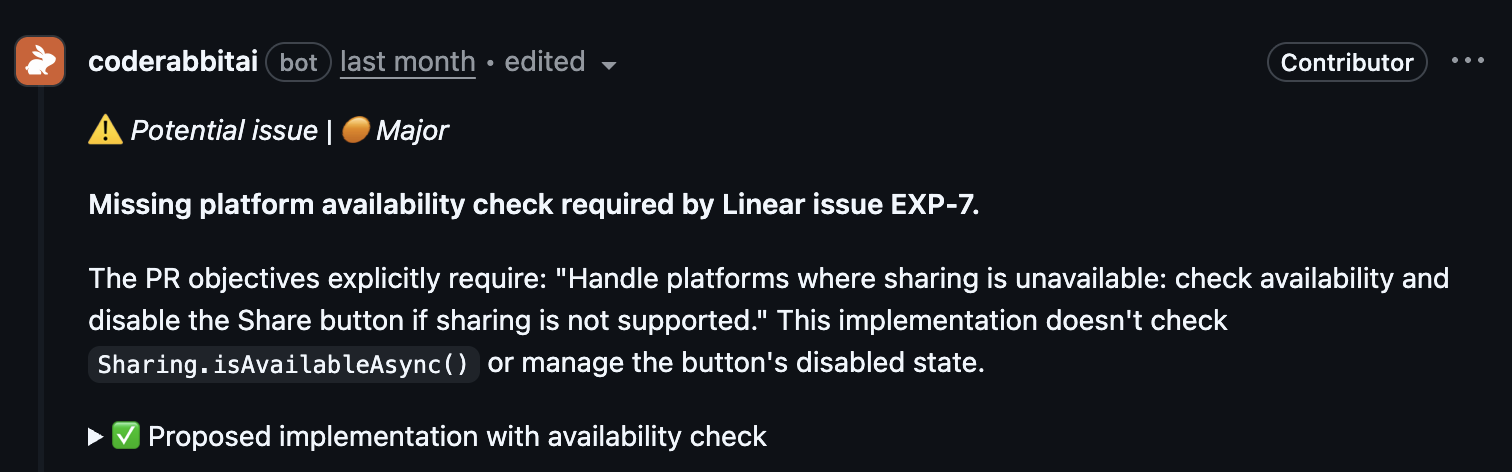
CodeRabbit identifies a missing requirement from the linked issue
Best practices for issue writing
Issue titles
Create descriptive, technical titles that clearly state the goal:- Good examples
- Poor examples
- “Add PrismaLint integration to configuration flow”
- “Fix race condition in user authentication”
- “Implement caching for GraphQL queries”
Issue descriptions
Write comprehensive descriptions that provide clear technical context:1
Problem statement
- Clearly describe what needs to be changed
- Include technical details about affected components
- Reference specific files or functions if known
2
Expected solution
- Outline the desired implementation approach
- Include code examples or pseudo-code when relevant
- List specific acceptance criteria
Consistent terminology
Use consistent terminology between issues and pull requests:- Good practices
- Poor practices
- Use the same technical terms consistently
- Reference components with their exact names
- Maintain consistent naming patterns
Linking issues effectively
In pull requests
- Direct references
- Multiple issues
Cross-references
For better traceability:1
Add PR references in issue comments
Link back to the pull request from the issue discussion
2
Use complete URLs for external systems
Include full URLs when referencing Jira, Linear, or other platforms
3
Maintain bidirectional links
Ensure related issues reference each other for complete context
How CodeRabbit assesses linked issues
CodeRabbit evaluates linked issues through this process:1
Analyze issue content
Reviews issue titles and descriptions for requirements and context. For Jira issues, this also includes named custom fields
2
Compare PR changes
Examines the code changes in the pull request
3
Validate requirements
Determines if the changes meet the stated objectives
4
Provide assessment
Returns one of three possible outcomes:
- ✅ Addressed: Objective completed (no explanation needed)
- ❌ Not addressed: Objective not met (explanation provided)
- ❓ Unclear: Uncertain if objective is met (explanation provided)
The issue title, description, and, for Jira issues, named custom fields are considered in the assessment. Comments and discussion threads are not currently analyzed.
Tips for better assessments
Be specific
- Include clear, measurable objectives
- List specific technical requirements
- Reference affected code components
Provide context
- Explain why changes are needed
- Document current behavior
- Describe expected outcomes
Use technical details
- Include file paths when known
- Reference specific functions or classes
- Mention relevant technologies
Keep it focused
- One main objective per issue
- Clear scope boundaries
- Specific acceptance criteria
Related resources
Review instructions
Learn how to add custom instructions to your reviews
Issue creation
Automatically create issues from PR reviews
Issue trackers
Set up Jira or Linear integrations for linked issues