

Plan structure
Each Coding Plan contains the following sections:Viewing a plan
Plans are displayed in the CodeRabbit web app with a dedicated plan viewer. Sections are collapsible, and a chat panel appears on the right for refinement.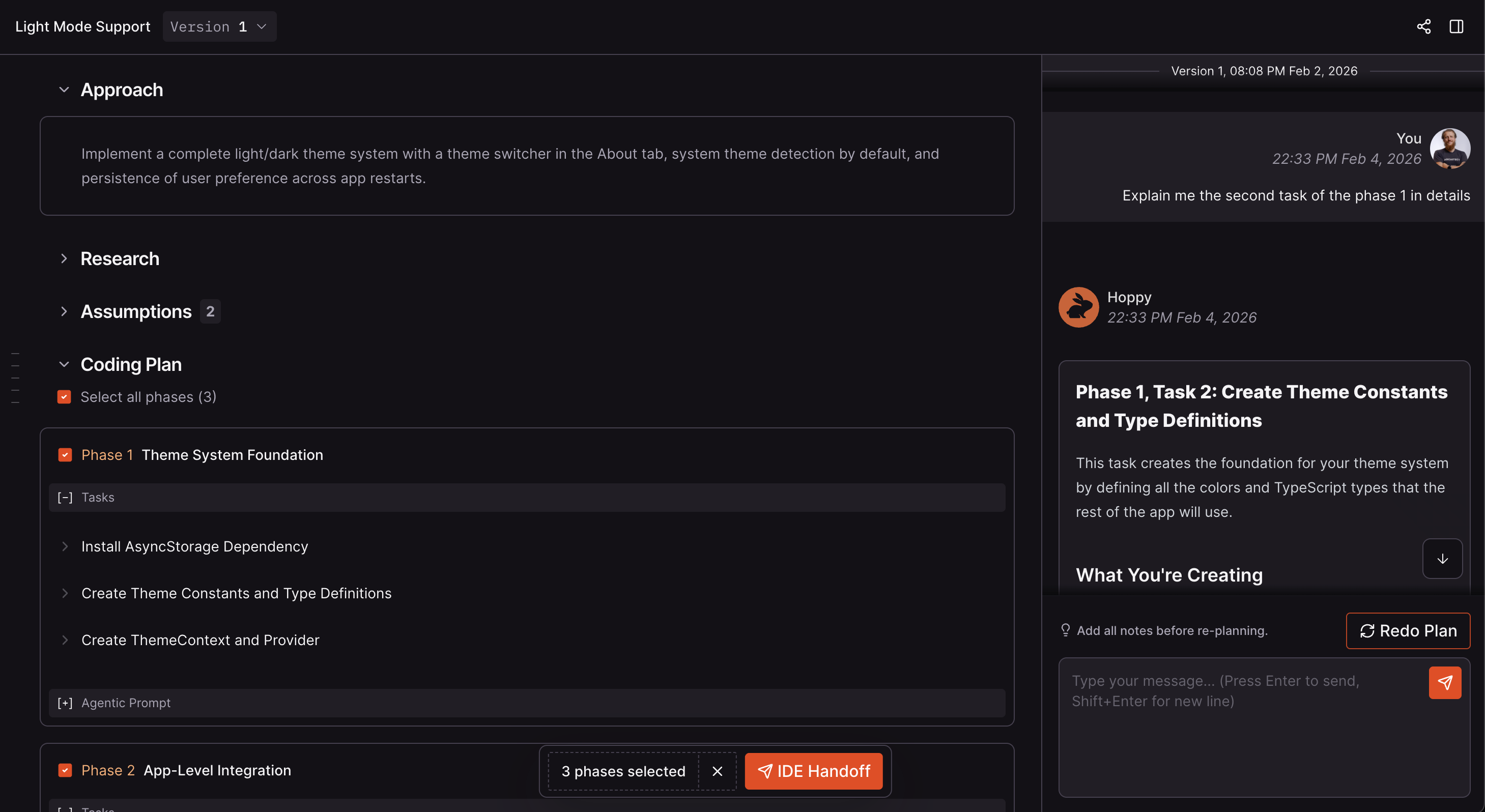
Coding Plan in the CodeRabbit web app
Refining a plan
After reviewing a Coding Plan, you can refine it through conversation with CodeRabbit:- Ask questions to get clarification on why CodeRabbit chose a particular approach.
- Challenge design choices by suggesting an alternative architecture or pattern.
- Request changes by asking CodeRabbit to add, remove, or modify specific tasks or phases.
- Provide additional context by sharing constraints, requirements, or team preferences that the original plan didn’t account for.
Re-planning and version history
When you need more than a small refinement, you can regenerate the plan entirely:- Provide feedback through chat explaining what should change.
- Trigger a re-plan: click the Redo button.
- CodeRabbit generates a new plan version incorporating your feedback.
- View previous versions of the plan.
- Compare what changed between versions.
- Switch the active version.
You can only chat about the currently active version of a plan.
Next Step
Agent Handoff
Select phases, copy agent-ready prompts, and paste them into your coding agent.